
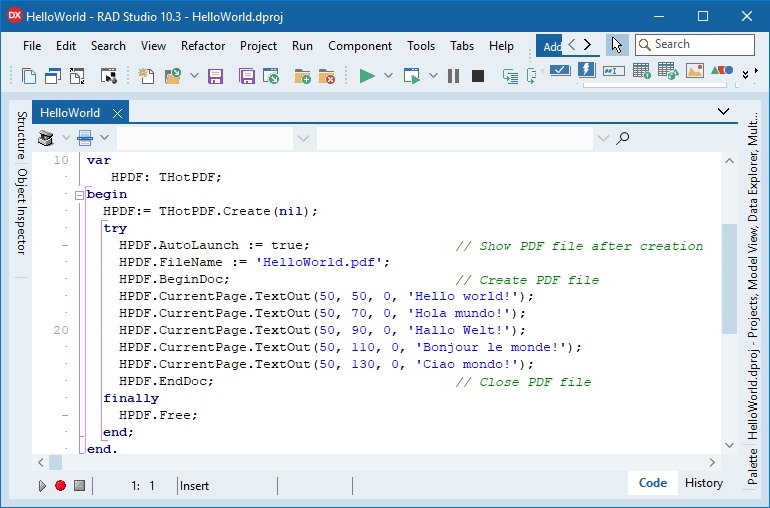
HotPDF at a glance
| Product | HotPDF Delphi Component — native VCL PDF authoring library for Delphi and C++Builder |
|---|---|
| Best for | Creating, editing, signing, and validating PDF documents directly from application code |
| IDE support | RAD Studio XE5 through 13.1 Florence (Delphi and C++Builder; Win32, Win64, Win64x); Free Pascal 3.2.2 / Lazarus (Win32, Win64) |
| Standards | PDF 1.3-1.7 with selected PDF 2.0 encryption; PDF/A-1/2/3 authoring plus PDF/A-4 conversion, PDF/UA-1, PDF/X-1a/3/4; PAdES B-B through B-LTA signing with DocMDP / FieldMDP certification |
| Deployment | Compiles into your executable; no external PDF runtime for core authoring |
| Source code | Full Object Pascal source included with every license |
| Licensing | Royalty-free, one-time $750-$9000 by tier; renewal at 40% of list price |
| Current version | 2.929.0 (2026-10-09) |
| Evaluation | Free demo package download |
Native PDF creation and editing for Delphi and C++Builder
HotPDF is a source-level Delphi and C++Builder PDF component for applications that need to create, edit, secure, sign, validate, and assemble PDF documents directly from VCL code. It does not require an external PDF runtime for its core authoring workflow and is designed for Windows desktop software built with RAD Studio.
Use HotPDF when your application needs programmatic page drawing, Unicode text output, font embedding and subsetting, forms, annotations, image import, PDF merge/edit operations, encryption, digital signatures, standards-aware output, and lightweight preflight automation from one native API surface.
HotPDF supports RAD Studio XE5 through RAD Studio 13.1 Florence for Delphi and C++Builder, including Win32, Win64, and Win64x workflows, and builds with Free Pascal 3.2.2 and Lazarus for Win32 and Win64.
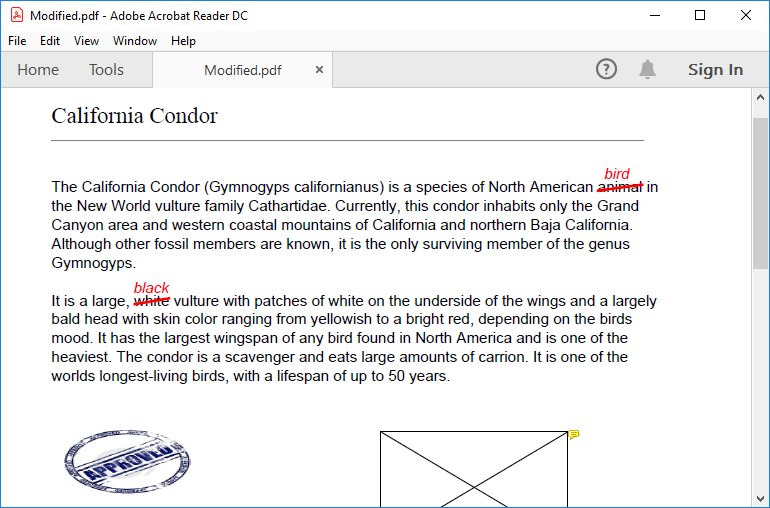
Main capabilities
- Create new PDFs, add pages, draw text and vector graphics, register reusable Form XObjects, place images, and save to files or caller-owned streams.
- Load existing PDFs, inspect page boxes, search bookmark destinations, copy pages, insert pages, extract pages, reorder pages, delete pages, merge documents, stamp or watermark content, and update document information.
- Add hyperlinks, named destinations, outlines, file attachments, comments, popups, highlight annotations, free-text annotations, redaction annotations, watermark annotations, page thumbnails, layers, page transitions, and viewer preferences.
- Create AcroForm fields, generated appearance streams, signature fields, multi-line and comb text fields, rich-text field values, XFA packet containers, form-field trigger wrappers, and multiple Unicode fonts in the AcroForm resource dictionary where the selected standard profile allows them.
- Inspect, update, rename, remove, or flatten fields in loaded AcroForm documents before saving an edited copy.
- Embed and subset TrueType, Type 1 PFB, OpenType-CFF, and CID-keyed CFF fonts for compact multilingual output, including CJK-heavy documents.
- Generate Unicode text, right-to-left text, vertical text, supplementary-plane characters such as emoji, Arabic / Persian / Urdu shaping, Latin standard ligatures, Devanagari reordering, and OpenType GSUB-based glyph output with matching
/CIDToGIDMap,/W, and/ToUnicodeintegration. - Import JPEG, bitmap, TIFF, JPEG2000, JBIG2, WMF, and EMF content, with zlib-ng Flate compression and libjpeg-turbo backed JPEG handling.
- Protect documents with passwords, AES-128, AES-256, PDF 2.0 AES-256 R6, public-key recipient encryption, and permission flags.
- Sign PDFs with in-process PFX / PKCS#12 support and PAdES B-B, B-T, B-LT, and B-LTA workflows including RFC 3161 timestamps and DSS / VRI dictionaries.
- Create text, JSON, and HTML preflight reports, apply preflight profiles and presets, aggregate batch results, embed report evidence in PDFs, compare reports, and run focused PDF/VT validation.
- Use optional PDF backends for FastReport, QuickReport, ReportBuilder, and DevExpress ExpressPrinting when existing report layouts should emit through HotPDF.
- Process very large PDFs at high speed with the Direct File API, which opens, copies, and rewrites documents directly on disk without loading the whole file into the object model. On a 2 GB benchmark document with 1.67 million objects, AES-256 encryption takes about 14 seconds, decryption about 16 seconds, and a full rewrite about 6 seconds; reading the page count of a 1.25 GB document takes milliseconds. Classic cross-reference tables, cross-reference streams, hybrid-reference files, and incrementally updated documents all stay on the direct path.
- Encrypt and decrypt with AES-256 at hardware speed: with CPU AES-NI, AES-256-CBC reaches about 442 MB/s for encryption and 832 MB/s for decryption (about 3× and 5.7× faster than the portable software path), file-to-file
EncryptFile/DecryptFilecalls protect or unprotect huge documents without building the object graph, and opening a large password-protected PDF uses far less memory. - Turn scans and photos into searchable PDFs with built-in OCR or pluggable Tesseract and RapidOCR adapters (DLL, CLI, or in-process ONNX), including scan orientation, skew, shadow, and perspective correction, multilingual model presets, and word-level confidence and geometry.
- Decode Code 128, EAN/UPC, QR, Data Matrix ECC 200, and PDF417 symbols from rendered pages and images, including multiple symbols per raster and perspective-distorted Data Matrix, and compare document or contract revisions with word-level insert, delete, replace, and move records and review artifacts.
- Drive headless document jobs through a JSON job schema and a C ABI — capabilities, rendering, Unicode text and form extraction, OCR layers, redaction, PFX signing, comparison, and atomic file publication — and run the portable core as native Linux code without an active desktop.
- Run dynamic XFA forms in process on Windows and Linux: QuickJS JavaScript and compiled FormCalc event scripts, SOM path resolution with wildcards, predicates, and relative occurrences, locale-aware date, time, and numeric picture clauses, a namespace-aware Data DOM with bidirectional bindings, and transactional rollback when a script fails. Native PDF page trees, repeated fields, choice lists, radio groups, checkboxes, push buttons, draws, and images can be created directly from XDP and saved runtime data.
- Fill rich-text form fields with typed Unicode style runs and genuine embedded regular, bold, italic, and bold-italic fonts, choose caller-supplied font families per grapheme, wrap with Unicode 17 line-breaking and grapheme rules, keep bidirectional paragraphs and paired brackets intact, and import or export styled FDF and XFDF into signed or encrypted documents.
- Apply signing policy end to end: signature seed values and certificate constraints, DocMDP certification with P1, P2, or P3 permissions, FieldMDP locks, legal attestations, named signature appearance profiles, embedded CRL and OCSP revocation evidence, RFC 3161 signature and standalone document timestamps with SHA-256, SHA-384, or SHA-512 imprints, and signatures on AES-encrypted documents that preserve the original revisions.
- Render demanding page content with the built-in renderer: CMYK and ICC transparency groups with every blend mode, function, axial, radial, Coons, tensor, and triangle mesh shadings, colored and uncolored tiling patterns, optional-content visibility, calibrated CalGray, CalRGB, and Lab colors, Separation and DeviceN tints, soft masks, 182 built-in legacy CMaps, CID-keyed CFF, and embedded Type 1 fonts.
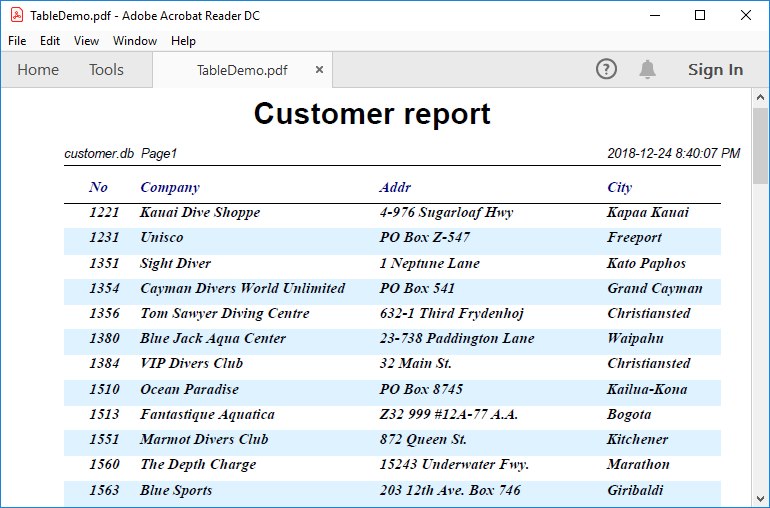
Download the HotPDF Delphi Component DEMO package
2026-10-09 Version 2.929.0: HotPDF changelog. The latest release builds scalar text, comb cells, choice labels, and button marks from ordered caller-supplied font families across native setters, Windows jobs, and the Windows and Linux callbacks. Releases since 2.854.0 create native XFA forms directly from XDP, including page trees, repeated fields, choice lists, radio groups, Boolean marks, push-button captions, draws, and images, and run the XFA JavaScript, FormCalc, Data DOM, and ICU locale runtime natively on Linux; add rich-text form fields with typed Unicode style runs, embedded four-style fonts, caller-supplied font fallback, Unicode 17 line breaking, bidirectional paragraphs, and GPOS mark attachment, with styled FDF and XFDF import and export through Windows file jobs and Linux JSON callbacks; extend signing with DocMDP P1 to P3 certification, named appearance profiles, standalone RFC 3161 document timestamps, SHA-384 and SHA-512 imprints, and authenticated Adobe revocation archival; render shadings, patch and triangle meshes, tiling patterns, optional content, dash arrays, CID-keyed CFF, and 182 built-in legacy CMaps, with Cairo output on Windows as well as Linux; and compare documents by text, structural graph, and rendered pixels, with annotated contract review PDFs.
Licensing and pricing
Pay with credit/debit cards, PayPal, AliPay, or wire transfer through 2Checkout / FastSpring -- every tier lists both checkouts, choose either. Every new HotPDF license includes the full Object Pascal source code, one year of updates, and one year of email support.
| License | Developers | Price (one-time) | Order |
|---|---|---|---|
| Single | 1 developer | $750 | Buy HotPDF Single |
| Small Business | Up to 10 developers | $1500 | Buy HotPDF Small Business |
| Medium Business | Up to 30 developers | $2250 | Buy HotPDF Medium Business |
| Enterprise | All developers in one company and its subsidiaries within a single country | $4500 | Buy HotPDF Enterprise |
| Corporate | All developers in one company and its subsidiaries worldwide | $9000 | Buy HotPDF Corporate |
License choice: Choose the tier that covers your developer headcount: Single (1 developer), Small Business (up to 10), or Medium Business (up to 30). Enterprise covers every developer in one company and its subsidiaries within a single country; Corporate extends that same coverage worldwide.
Enterprise and Corporate source extras: HotPDF Enterprise and Corporate both include complete source code for dedicated tool-grade examples, currently PDF Preflight Pro and XFA & AcroForms Flattener Pro; source code for the internal testing projects is available on request.
Existing customer renewal: Renew update access at 40% of the current list price; if your update service has been interrupted for more than 1 year, a full-price purchase is required instead. Open the HotPDF purchase and renewal page.
Standards, signing, and validation workflows
HotPDF supports standards-aware PDF generation workflows for PDF/A-1, PDF/A-2, PDF/A-3, PDF/X-1a, PDF/X-3, PDF/X-4, and PDF/UA-1. It also includes preflight and focused PDF/VT validation helpers for review and automation workflows. The component exposes profile-specific switches and guards so calls that would break the selected profile can fail early instead of silently writing a non-conformant PDF.
| Workflow | HotPDF support | Author responsibility |
|---|---|---|
| PDF/A-1, PDF/A-2, PDF/A-3 | PDFACompliance, XMP pdfaid metadata, OutputIntent support, font-embedding enforcement, JavaScript/encryption/annotation/profile guards, and PDF/A-2A / PDF/A-3A smoke outputs validated with veraPDF. | Choose the target level, provide real ICC OutputIntent data, set title/language, embed appropriate fonts, and avoid content outside the selected archival profile. |
| PDF/UA-1 | PDFUACompliance, Tagged PDF root, pdfuaid metadata, /Lang, DisplayDocTitle, structure elements, marked content, role mapping, ParentTree wiring, alternate text and ActualText helpers. | Build meaningful document structure, reading order, heading hierarchy, list/table semantics, and alternative descriptions for real content. |
| PDF/X-1a, PDF/X-3, PDF/X-4 | PDFXCompliance, OutputIntent support, prepress profile guards, and restrictions for interactive or non-print-safe features. | Provide print-appropriate color management, page boxes, and production settings for the chosen prepress workflow. |
| PDF/VT validation | ValidatePDFVT checks XMP PDF/VT identification, metadata namespace, modification-date consistency, PDF/X base markers, OutputIntent, catalog DPartRoot structure, loadable pages, and page-level DPart coverage. | Use it to audit incoming or produced files; authoring the full variable-data production intent remains the caller's responsibility. |
PDF/A Level A enables the Tagged PDF foundation required by the archival profile. It does not automatically advertise PDF/UA-1; HotPDF emits the PDF/UA identity only when PDFUACompliance is explicitly enabled.
Preflight APIs can produce text, JSON, and HTML reports, filter output through saved profiles or built-in presets, aggregate batch results, embed report evidence in a review copy, compare reports, and convert reports into a veraPDF-style structure for downstream tooling.
Additional feature coverage
- OpenType GSUB LookupType 1-8 support, script/language feature selection, Latin standard ligatures, Arabic / Persian / Urdu shaping, Devanagari reordering, and PUA synthetic codepoint emission for font-specific glyphs.
- XFA packet container support, AcroForm
/AAtrigger wrappers, multiple Unicode fonts in AcroForm/DR, and generated CID-font appearance streams. - Incremental update saving, multi-signature workflows, signature placeholders, in-process CMS SignedData generation, and long-term validation dictionaries.
- Loaded-document helpers for page-box inspection, bookmark destination lookup, AcroForm field inspection, field value updates, field renaming, field removal, and form flattening.
- Preflight profile load/save/validate/merge/diff helpers, batch aggregation, embedded report validation, XMP report embedding, focused PDF/VT validation, and conservative repair from preflight reports.
- PDF 1.3 through PDF 1.7 feature gates, selected PDF 2.0 encryption support, object streams, XRef streams, OutputIntents, transparency groups, soft masks, patterns, shadings, and prepress ExtGState controls.
Quick Delphi example
program HelloHotPDF;

uses
  System.SysUtils,
  HPDFDoc;

var
  PDF: THotPDF;
begin
  PDF := THotPDF.Create(nil);
  try
    PDF.AutoLaunch := False;
    PDF.FileName := 'HelloHotPDF.pdf';
    PDF.Compression := cmFlateDecode;
    PDF.EnableFontSubsetting := True;
    PDF.BeginDoc;
    PDF.CurrentPage.SetFont('Arial', [], 18);
    PDF.CurrentPage.TextOut(50, 50, 0, 'Hello HotPDF');
    PDF.EndDoc;
  finally
    PDF.Free;
  end;
end.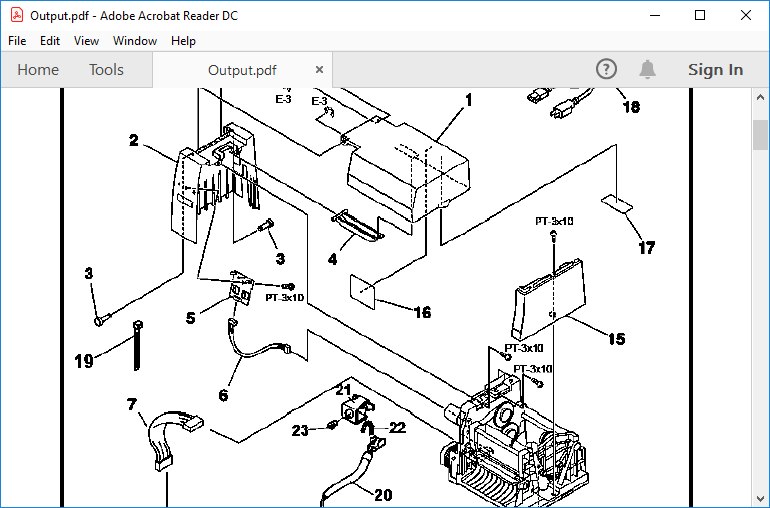
Download the HotPDF Delphi Component DEMO package
Supports RAD Studio XE5 through RAD Studio 13.1 Florence for Delphi and C++Builder (Win32, Win64, and Win64x workflows) and Free Pascal 3.2.2 / Lazarus (Win32, Win64)
When to choose HotPDF
- Choose HotPDF when your application creates or edits PDF documents and you would rather ship nothing alongside it: HotPDF carries its own rendering engine, image codecs, and font engine, so it compiles straight into your executable with no PDF runtime to redistribute or audit.
- Choose PDFium Delphi Component when the work is reading and reviewing rather than authoring: viewer architecture, accessible read-aloud, table extraction, semantic reflow to HTML, and standards validation. It renders through
pdfium.dll, which you redistribute with your application. - Choose PDF Library for Delphi when you need PKCS#11 hardware-token signing, EU trust-list validation, or DOCX export, or when non-Delphi code has to call in through DLL, ActiveX, or Dylib.
Comparing the whole family? See the PDF developer libraries overview for a side-by-side of PDFium Delphi Component, losLab PDF Library, and HotPDF Delphi Component.
Frequently asked questions
Which Delphi and C++Builder versions does HotPDF support?
HotPDF supports RAD Studio XE5 through RAD Studio 13.1 Florence for both Delphi and C++Builder, covering Win32, Win64, and Win64x application targets. The whole library also builds with Free Pascal 3.2.2 and Lazarus for Win32 and Win64, with native Flate compression and AES encryption.
Does HotPDF require Adobe Acrobat or an external PDF runtime?
No. HotPDF compiles into your application and creates, edits, signs, and validates PDF documents in process; the core authoring workflow does not deploy or call an external PDF runtime.
Is the full source code included?
Yes. Every license includes the complete Object Pascal source code. The Enterprise license adds source code for the tool-grade examples PDF Preflight Pro and XFA & AcroForms Flattener Pro; source code for the internal testing projects is available on request.
Is HotPDF royalty-free?
Yes. Licensed applications ship royalty-free with no per-document, per-user, or per-server fees, in unlimited applications.
Can HotPDF produce PDF/A, PDF/UA, and PDF/X compliant documents?
Yes. HotPDF supports standards-aware output for PDF/A-1, PDF/A-2, PDF/A-3, PDF/UA-1, PDF/X-1a, PDF/X-3, and PDF/X-4, with profile guards that fail early instead of silently writing a non-conformant file, plus text, JSON, and HTML preflight reports. Compatible documents can also be converted to searchable PDF/A-4 and validated with veraPDF before the file is published.
Can HotPDF edit, merge, and stamp existing PDF files?
Yes. HotPDF loads existing documents for page copy, insert, extract, reorder, delete, merge, watermark and stamp operations, document information updates, and AcroForm field inspection, updates, and flattening.
How does HotPDF handle very large PDF files?
The Direct File API opens, copies, and rewrites documents directly on disk without loading the whole file into memory. On a 2 GB benchmark with 1.67 million objects, AES-256 encryption takes about 14 seconds and a full rewrite about 6 seconds; with CPU AES-NI, AES-256 reaches about 442 MB/s encryption and 832 MB/s decryption. Review the documented Direct File API benchmark context and reproduce the workflow with your own files and hardware.
What does a HotPDF license include, and how does renewal work?
A new license ($750 Single, $1500 Small Business (up to 10 developers), $2250 Medium Business (up to 30 developers), $4500 Enterprise (one company, one country), $9000 Corporate (one company, worldwide)) includes full source code, one year of updates, and one year of email support. Existing customers renew update access at 40% of the full price.
Discover more from Delphi PDF Component & Spreadsheet Development
Subscribe to product updates
Subscribe to get the latest updates sent to your email.