
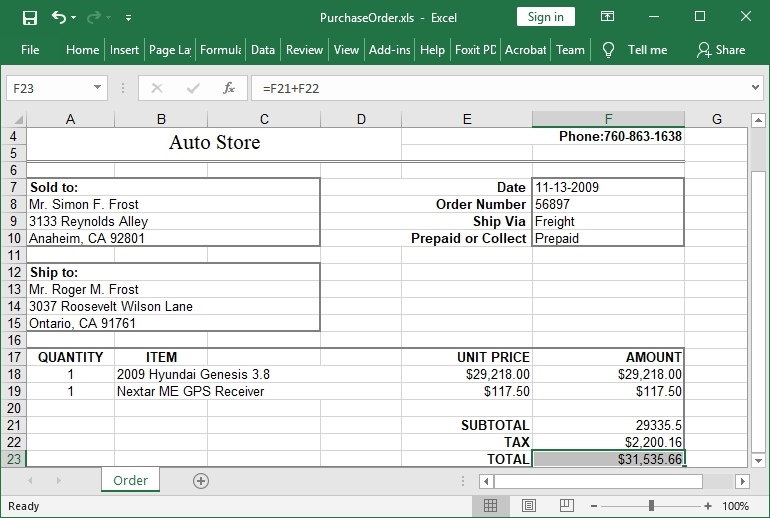
HotXLS Delphi Component In het kort
| Product | HotXLS Delphi Component |
|---|---|
| Geschikt voor | Door de ontwikkelaar beheerde documentworkflows in Delphi en C++Builder |
| IDE-ondersteuning | Delphi en C++Builder XE5 tot en met 13 Florence; Free Pascal 3.2.2 / Lazarus LCL (Win32, Win64); native Free Pascal-werkmapkern op Linux x64 en macOS ARM64 |
| Berekeningen | Ingebouwde formule-engine met verwijzingen tussen werkbladen, gedefinieerde namen, dynamic-array spill ranges, reguliere-expressiefuncties, GROUPBY / PIVOTBY en gebruikersfuncties |
| Implementatie | Integratie in native Windows-toepassingen |
| Broncode | Object Pascal-broncode is inbegrepen bij commerciële licenties |
| Licenties | Royaltyvrije implementatie van toepassingen |
| Updates | Eén jaar updates en e-mailondersteuning inbegrepen |
| Prijzen | Eenmalige licentie op basis van het aantal ontwikkelaars |
| Huidige versie | 2.384.120 (2026-10-09) |
| Documentatie | HotXLS Delphi Component |
| Evaluatie | HotXLS Delphi Component |
Native Excel-werkmapautomatisering voor Delphi en C++Builder
Huidige HotXLS-release: versie 2.384.120 (2026-10-09). De nieuwste release brengt Classic XLS-diagrammen naar draagbare uitvoer: kolom-, staaf-, lijn-, spreidings-, cirkel-, doughnut- en vlakdiagrammen met één reeks worden vastgelegd uit gevalideerde opgeslagen waarden, met hun kernweergave en de opgegeven plot-, titel- en legendagrenzen, en worden vervolgens getekend naar zelfstandige PDF-, SVG- en PNG-uitvoer; begrensde helpers inspecteren opgeslagen formuleverwijzingen en gecachte diagramcellen zonder formules te evalueren. Releases sinds 2.384.109 brengen de werkmapkern native naar Linux x64 en macOS ARM64, waar toepassingen XLSX-, XLSB-, ODS- en Classic BIFF8 XLS-bestanden laden, bewerken, berekenen en opslaan, inclusief RC4- en CryptoAPI-versleuteling, en voegen draagbare PDF-, SVG- en PNG-uitvoer toe met rich text, vormen, afbeeldingen, afbeeldingen in cellen, checkboxes, zeven gecachte diagramfamilies en complete print plans. Native Pivot-uitvoer kreeg compacte, tabellarische en overzichtelijke layouts, numerieke, datum- en handmatige groepering, alle elf subtotalen, Show Values As-weergaveberekeningen en berekende velden en items; de formule-engine kreeg functies voor reguliere-expressietest, -extractie en -vervanging plus GROUPBY en PIVOTBY; XLSX kreeg getypeerde afbeeldingen in cellen en Checkbox-formaten; en de XLSB-dekking breidde uit naar formules, namen, samengevoegde cellen, hyperlinks, vensters, tabellen en filters. Aangegeven codepagina’s voor BIFF5-tekst, atomair undo en redo voor bereikwissingen en Unicode-plakacties, en consistente Unicode-naammatching over platforms heen maken de reeks compleet. Zie de release notes voor de volledige wijzigingsgeschiedenis.
HotXLS ondersteunt Delphi XE5 tot Delphi 13 Florence en C++Builder XE5 tot C++Builder 13 Florence, en bouwt daarnaast met Free Pascal 3.2.2 en Lazarus/LCL onder Windows (Win32 en Win64); de optionele draagbare werkmapkern compileert bovendien native voor Linux x64 en macOS ARM64. Het pakket bevat Delphi- en C++Builder-demo’s, API-documentatie, voorbeelden voor werkmapbewerking en rapportexport, en volledige Object Pascal / Delphi-broncode voor gelicentieerde klanten.
Twee gerichte workbook-API's
| API-oppervlak | Primair gebruik |
|---|---|
lxHandle | Klassieke Excel 97-2003 BIFF8 .xls-workflows, inclusief lezen en schrijven van werkmappen, formules, opmaak, opmerkingen, hyperlinks, grafiekbladen, ondersteuning voor draaitabellen, behoud van VBA-payloads en exports naar HTML, RTF, CSV en TSV. |
lxHandleX | Excel 2007+ OOXML .xlsx-workflows, inclusief werkmap- en stream-I/O, stijlpaletten, gedeelde tekenreeksen, werkbladtabellen, grafieken, opmerkingen, tekeningen, externe koppelingen, XLSX-specifieke exports en streaming schrijven voor grotere bladen. |
Belangrijkste mogelijkheden
- XLS-, XLSX- en XLSB-werkmapworkflows: Excel-werkmappen maken, openen, wijzigen en opslaan vanuit bestanden of streams, XLSB-invoer automatisch detecteren met conversiekwaliteitsrapporten, en snel werkbladnamen uit XLS- of XLSX-pakketten tonen zonder elk werkblad te laden.
- Cel-, bereik- en sjabloonbewerking: getallen, tekenreeksen, datums, booleans, formules, samengevoegde cellen, rij- en kolomgroottes, verborgen rijen en kolommen, overzichten, selecties en werkmapbereiken lezen en schrijven. Callbackhelpers kunnen geladen cellen scannen, bereiken vullen, tekst zoeken en sjabloonplaatsaanduidingen vervangen.
- Opmaak en pagina-indeling: lettertypen, kleuren, randen, vullingen, uitlijning, getalnotaties, rich text, themakleuren, geïndexeerde paletten, tabkleuren, pagina-instelling, kopteksten, voetteksten, afdruktitels, pagina-einden en werkbladweergaveopties toepassen.
- Formules en berekening: formules evalueren met de ingebouwde rekenengine voor klassieke XLS- en XLSX-werkmappen, inclusief celverwijzingen, bereiken, verwijzingen tussen bladen, gedefinieerde namen en toepassingsfuncties via een
OnUserFunction-callback, plus dynamic-array spill ranges, reguliere-expressiefuncties en GROUPBY / PIVOTBY-aggregatie. - Werkmapgegevens: werken met hyperlinks, interne bladankers, gedefinieerde namen, opmerkingen, voorwaardelijke opmaak, gegevensvalidatie, AutoFilter-bereiken en -criteria, Excel-tabellen, documenteigenschappen, externe koppelingen en draaitabelrecords.
- Afbeeldingen, grafieken en tekeningen: afbeeldingen insluiten, werkbladgrafieken en grafiekbladen maken, VBA-projectpayloads behouden en door Excel gemaakte OfficeArt-connector-, solver-, vorm- en opmerkingmetadata stabiel houden tijdens ondersteunde round-trip saves.
- Beveiliging en versleuteling: werkblad- en werkmapbeveiliging, klassieke XLS-wachtwoordworkflows en AES-beveiligde XLSX-opslaguitvoer verwerken, terwijl niet-ondersteunde leespaden voor versleutelde pakketten expliciet blijven in de ontwikkelaarsdocumentatie.
- Pivottabellen en rapporten: native Pivot-uitvoer met compacte, tabellarische en overzichtelijke layouts, meerdere meetwaarden, numerieke, datum- en handmatige groepering, alle elf subtotalen, Show Values As-berekeningen, berekende velden en items, en Timelines en Slicers op gedeelde caches.
- Linux- en macOS-werkmapkern: het optionele
LX_PORTABLE_CORE-profiel compileertTXLSWorkbookenTXLSXWorkbookmet Free Pascal voor Linux x64 en macOS ARM64 (macOS 11 of nieuwer), met laden, bewerken, berekenen en opslaan van XLS-, XLSX-, XLSB- en ODS-bestanden zonder LCL. - Draagbare PDF-, SVG- en PNG-uitvoer: render werkbladen met rich text, vormen, afbeeldingen, afbeeldingen in cellen, checkboxes, gecachte XLSX-diagrammen en Classic XLS-kolom-, staaf-, lijn-, spreidings-, cirkel-, doughnut- en vlakdiagrammen via onveranderlijke print plans die print areas, herhaalde titels, pagina-einden, marges, schaling en paginavolgorde respecteren.
- Exporthelpers: werkmappen, werkbladen, geselecteerde bereiken, databasetabellen en DBGrid-inhoud exporteren naar Excel, HTML, RTF, CSV en TSV, inclusief HTML-tabelfragmenten voor previews, e-mails of webrapporten.
Ontworpen voor gecontroleerde automatisering
HotXLS is nuttig wanneer Office-automatisering niet past bij een productieproces. Spreadsheetverwerking blijft binnen het proces van uw toepassing, vermindert afhankelijkheid van interactieve desktopsessies en maakt implementatie eenvoudiger voor onbeheerde tools en server-side taken.
De bibliotheek is ontwikkeld rond gedocumenteerde werkmapstructuren en praktische Excel-interoperabiliteit. Recente releases richten zich op het behouden van door Excel geschreven records, werkmapmetadata, opmerkingen, hyperlinks, externe-linkgegevens, werkbladstatus, beveiligingsopties, VBA-inhoud, tabelgegevens, AutoFilter-status, tekenrecords en weergave-instellingen tijdens open/save-roundtrips. Die aanpak helpt toepassingen gerichte wijzigingen te maken zonder onnodig delen van de werkmap te herschrijven die zij niet beheren.
HotXLS is een zelfstandig product van losLab Software. Microsoft Excel is niet vereist tijdens runtime, en deze pagina claimt geen Microsoft-certificering, goedkeuring of merkrecht.
Veelvoorkomende gebruiksscenario's
| Scenario | Hoe HotXLS helpt |
|---|---|
| Rapportgeneratie | Opgemaakte werkmappen maken vanuit toepassingsgegevens, databasetabellen, DBGrid-inhoud of callback-gestuurde werkbladschrijvers. |
| Templatebewerking | Een bestaande werkmap openen, tekstplaatsaanduidingen zoeken en vervangen, bereiken vullen, omliggende metadata behouden en het bewerkte bestand opslaan. |
| Werkmapinspectie | Werkbladnamen, bereiken, documenteigenschappen, opmerkingen, hyperlinks, namen, filters en geselecteerde werkmapmetadata lezen vanuit gecontroleerde code. |
| Export zonder Office | Excel-compatibele uitvoer genereren op machines waarop Microsoft Office niet is geïnstalleerd, inclusief services en onbeheerde batchtaken. |
| Ondersteuning voor klassieke en moderne werkmappen | Gebruik één componentfamilie voor klassieke BIFF8-.xls-workflows, huidige OOXML-.xlsx-workflows, binair XLSB-lezen en -schrijven en ODS-import/export. |
| Linux- en macOS-services | Draai hetzelfde laden van werkmappen, berekeningen en PDF-, SVG- of PNG-uitvoer in Free Pascal-services op Linux x64 en macOS ARM64. |
| Preview- en conversiepijplijnen | Hele werkbladen of geselecteerde bereiken exporteren naar HTML, RTF, CSV of TSV voor previews, e-mailfragmenten, imports en downstreamsystemen. |
| Auditbare documentpijplijnen | Werkmaptransformaties binnen uw eigen Delphi- of C++Builder-codepad houden in plaats van een externe UI-toepassing aan te sturen. |
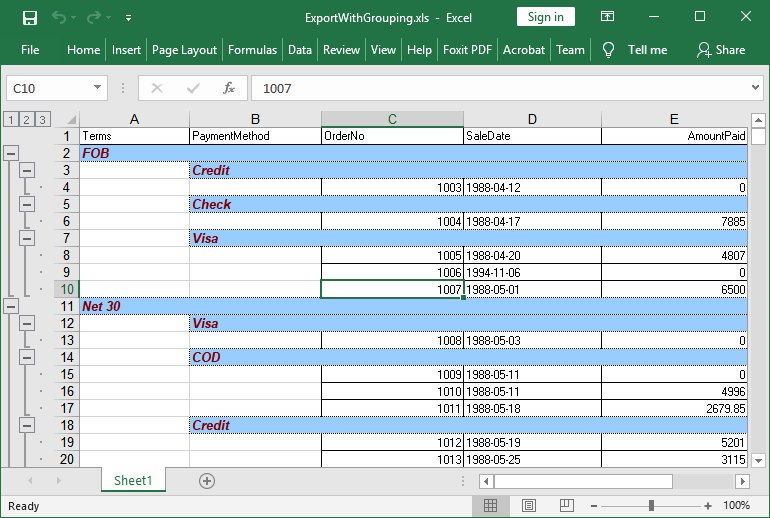
Evaluatie, licenties en ondersteuning
HotXLS Delphi Spreadsheet Component-demopakket downloaden om de demo's en API-documentatie vóór aankoop te bekijken.
Nieuwe commerciële licenties bevatten de volledige Object Pascal / Delphi-broncode, een jaar software-updates, een jaar e-mailondersteuning en royaltyvrij gebruik in onbeperkte toepassingen onder de gekozen ontwikkelaarslicentie.
Betaal met creditcard/debetkaart, PayPal, AliPay of bankoverschrijving via 2Checkout / FastSpring – in elk licentieniveau staan beide checkouts vermeld, kies er gewoon een.
| Licentie | Ontwikkelaars | Prijs | Bestellen |
|---|---|---|---|
| Single | 1 ontwikkelaar | $650 | Bestellen |
| Small Business | tot 10 ontwikkelaars | $1300 | Bestellen |
| Medium Business | tot 30 ontwikkelaars | $1950 | Bestellen |
| Enterprise | Alle ontwikkelaars in één bedrijf en zijn dochterondernemingen binnen één land | $3900 | Bestellen |
| Corporate | Alle ontwikkelaars in één bedrijf en zijn dochterondernemingen wereldwijd | $7800 | Bestellen |
Broncode-extra’s voor Enterprise en Corporate: HotXLS Enterprise en Corporate bevatten beide de volledige broncode van het speciale tool-grade voorbeeld Workbook Audit & Conversion Workbench Pro. Broncode van de complete testsuites die normaal alleen voor interne validatie worden gebruikt, is op aanvraag beschikbaar.
Jaarlijkse verlenging kopen voor bestaande licenties. De verlengingsprijs staat op de HotXLS-aankooppagina.
HotXLS-onlinedocumentatie openen or contact opnemen met losLab Software met licentie- en technische vragen.
Snel Delphi-voorbeeld
procedure QuickStart;
begin
  { Review the shipped HotXLS Delphi Component demo package for the complete Delphi sample. }
end;
HotXLS Delphi Component includes ready-to-run Delphi examples that show the core workflow before production integration.
Veelgestelde vragen
Welke Delphi- en C++Builder-versies worden ondersteund?
HotXLS ondersteunt Delphi XE5 tot en met Delphi 13 Florence en C++Builder XE5 tot en met C++Builder 13 Florence. Daarnaast bouwt de component met Free Pascal 3.2.2 en Lazarus/LCL onder Windows (Win32 en Win64), waar de XLS- en XLSX-API’s, formules, stijlen, dataset-export en rendering-hulpfuncties rechtstreeks vanuit FPC-code werken, zonder zlib-DLL. Native Free Pascal-builds voor Linux x64 en macOS ARM64 gebruiken de draagbare werkmapkern om werkmappen te laden, bewerken, berekenen en op te slaan.
Is de broncode inbegrepen?
Commerciële licenties bevatten Object Pascal-broncode voor integratie, review en onderhoud op lange termijn.
Zijn er runtimeroyalty's vereist?
Gelicentieerde toepassingen kunnen royaltyvrij worden uitgerold, zonder runtimekosten per document of per eindgebruiker.
Hoe evalueer ik het product?
Download het demopakket en bekijk de online documentatie vóór aankoop.
Wat is inbegrepen bij een nieuwe licentie?
Een nieuwe licentie omvat broncode, één jaar updates en één jaar e-mailondersteuning.
Hoe werkt verlenging?
Bestaande klanten kunnen toegang tot updates verlengen tegen de gepubliceerde verlengingsprijs.
Waar vind ik de API-documentatie?
De documentatie is beschikbaar via de gelokaliseerde HotXLS Delphi Component-documentatielink op deze pagina.
Wat omvat een HotXLS-licentie en hoe werkt verlenging?
Een nieuwe licentie ($650 Single, $1300 Small Business (tot 10 ontwikkelaars), $1950 Medium Business (tot 30 ontwikkelaars), $3900 Enterprise (één bedrijf, één land), $7800 Corporate (één bedrijf, wereldwijd)) omvat de volledige broncode, één jaar updates en één jaar e-mailondersteuning. De verlengingsprijs voor bestaande klanten staat op de HotXLS-aankooppagina.
Meer over Delphi PDF- en spreadsheetcomponenten ontdekken
Abonneren op productupdates
Abonneer u om de nieuwste berichten per e-mail te ontvangen.