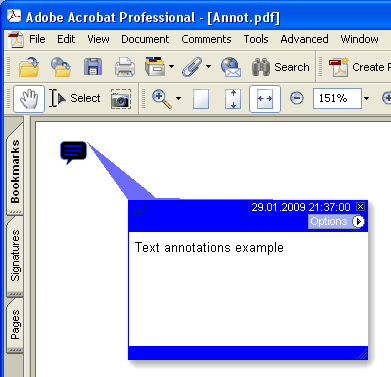
Adiciona nova anotação Text na página atual.
type
THPDFTextAnnotationType = ( taComment, taKey, taNote, taHelp, taNewParagraph, taParagraph, taInsert );
Sintaxe Delphi:
procedure AddTextAnnotation ( Contents: AnsiString; Rectangle: TRect; Open: boolean; Name: THPDFTextAnnotationType; Color: TColor = clRed );
procedure AddTextAnnotation ( Contents: AnsiString; Rectangle: TRect; Open: boolean; Name: THPDFTextAnnotationType; Title: AnsiString; Color: TColor = clRed );
Sintaxe C++:
void __fastcall AddTextAnnotation ( AnsiString Contents, Windows::TRect &Rectangle, bool Open, THPDFTextAnnotationType Name, Graphics::TColor Color );
void __fastcall AddTextAnnotation ( AnsiString Contents, Windows::TRect &Rectangle, bool Open, THPDFTextAnnotationType Name, AnsiString Title, Graphics::TColor Color );
Descrição
Use AddTextAnnotation para adicionar nova anotação Text mensagem de texto especificada ( Contents), área do retângulo ( Rectangle ), visualização do ícone ( Name ) e cor na página atual. Defina Open como true para abrir a anotação ou Open como false para fechá-la. A sobrecarga com Title grava a entrada /T de título ou autor da anotação de texto do PDF
Value Significado
taComment Comment
taKey Key
taNote Note
taHelp Help
taNewParagraph NewParagraph
taParagraph Paragraph
taInsert Insert