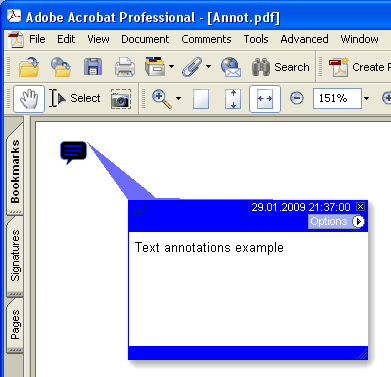
현재 페이지에 새 Text 주석을 추가합니다
type
THPDFTextAnnotationType = ( taComment, taKey, taNote, taHelp, taNewParagraph, taParagraph, taInsert );
Delphi syntax:
procedure AddTextAnnotation ( Contents: AnsiString; Rectangle: TRect; Open: boolean; Name: THPDFTextAnnotationType; Color: TColor = clRed );
procedure AddTextAnnotation ( Contents: AnsiString; Rectangle: TRect; Open: boolean; Name: THPDFTextAnnotationType; Title: AnsiString; Color: TColor = clRed );
C++ syntax:
void __fastcall AddTextAnnotation ( AnsiString Contents, Windows::TRect &Rectangle, bool Open, THPDFTextAnnotationType Name, Graphics::TColor Color );
void __fastcall AddTextAnnotation ( AnsiString Contents, Windows::TRect &Rectangle, bool Open, THPDFTextAnnotationType Name, AnsiString Title, Graphics::TColor Color );
Description
현재 페이지에 AddTextAnnotation으로 새 Text 주석을 추가하며, 텍스트 메시지( Contents), 사각형 영역( Rectangle ), 아이콘 모양( Name ), 색상을 지정합니다. Open 값을 true로 하면 주석이 열린 상태로, false로 하면 닫힌 상태로 추가됩니다. Title이 있는 오버로드는 PDF 텍스트 주석의 /T 제목 또는 작성자 항목을 기록합니다
Value Meaning
taComment Comment
taKey Key
taNote Note
taHelp Help
taNewParagraph NewParagraph
taParagraph Paragraph
taInsert Insert