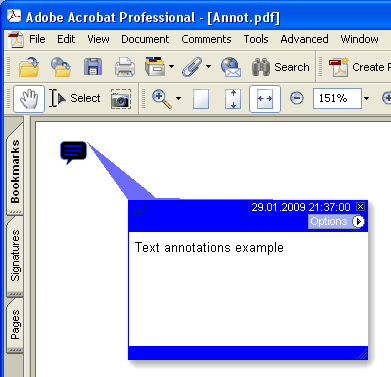
Aggiunge una nuova annotazione Text sulla pagina corrente.
type
THPDFTextAnnotationType = ( taComment, taKey, taNote, taHelp, taNewParagraph, taParagraph, taInsert );
Sintassi Delphi:
procedure AddTextAnnotation ( Contents: AnsiString; Rectangle: TRect; Open: boolean; Name: THPDFTextAnnotationType; Color: TColor = clRed );
procedure AddTextAnnotation ( Contents: AnsiString; Rectangle: TRect; Open: boolean; Name: THPDFTextAnnotationType; Title: AnsiString; Color: TColor = clRed );
Sintassi C++:
void __fastcall AddTextAnnotation ( AnsiString Contents, Windows::TRect &Rectangle, bool Open, THPDFTextAnnotationType Name, Graphics::TColor Color );
void __fastcall AddTextAnnotation ( AnsiString Contents, Windows::TRect &Rectangle, bool Open, THPDFTextAnnotationType Name, AnsiString Title, Graphics::TColor Color );
Descrizione
Usa AddTextAnnotation per aggiungere una nuova annotazione Text con messaggio di testo specificato ( Contents), rectangle area ( Rectangle ), icon view ( Name ) and color sulla pagina corrente. Imposta il valore Open a true per aprire l'annotazione o a false per chiuderla. L'overload con Title scrive l'annotazione testuale PDF /T voce titolo o autore
Valore Significato
taComment Comment
taKey Key
taNote Note
taHelp Help
taNewParagraph NewParagraph
taParagraph Paragraph
taInsert Insert