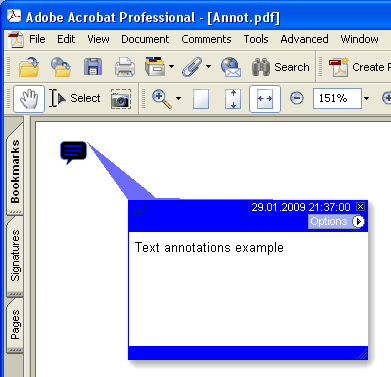
Añade una nueva anotación de texto en la página actual.
type
THPDFTextAnnotationType = ( taComment, taKey, taNote, taHelp, taNewParagraph, taParagraph, taInsert );
Sintaxis Delphi:
procedure AddTextAnnotation ( Contents: AnsiString; Rectangle: TRect; Open: boolean; Name: THPDFTextAnnotationType; Color: TColor = clRed );
procedure AddTextAnnotation ( Contents: AnsiString; Rectangle: TRect; Open: boolean; Name: THPDFTextAnnotationType; Title: AnsiString; Color: TColor = clRed );
Sintaxis C++:
void __fastcall AddTextAnnotation ( AnsiString Contents, Windows::TRect &Rectangle, bool Open, THPDFTextAnnotationType Name, Graphics::TColor Color );
void __fastcall AddTextAnnotation ( AnsiString Contents, Windows::TRect &Rectangle, bool Open, THPDFTextAnnotationType Name, AnsiString Title, Graphics::TColor Color );
Descripción
Use AddTextAnnotation para añadir una nueva anotación de Texto con el mensaje de texto especificado ( Contents), el área rectangular ( Rectangle ), la vista de icono ( Name ) y el color en la página actual. Asigne el valor Open a true para abrir la anotación o a false para cerrarla. La sobrecarga con Title escribe la entrada de título o autor /T de la anotación de texto PDF
Valor Significado
taComment Comentario
taKey Key
taNote Nota
taHelp Help
taNewParagraph NewParagraph
taParagraph Paragraph
taInsert Insert