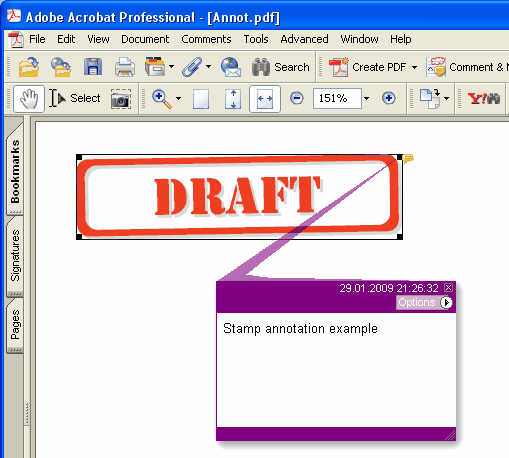
Añade una nueva anotación Stamp a la página actual.
type
THPDFStampAnnotationType = (satApproved, satExperimental, satNotApproved, satAsIs, satExpired,
satNotForPublicRelease, satConfidential, satFinal, satSold, satDepartmental,
satForComment, satTopSecret, satDraft, satForPublicRelease);
Sintaxis Delphi:
procedure AddStampAnnotation ( Contenido: AnsiString; Rectangle: TRect; StampType: THPDFStampAnnotationType; Color: TColor = clRed );
Sintaxis C++:
void __fastcall AddStampAnnotation ( AnsiString Contenido, Windows::TRect &Rectangle, THPDFStampAnnotationType StampType, Graphics::TColor Color);
Descripción
Utilice AddStampAnnotation para agregar una nueva anotación Stamp con mensaje de texto especificado ( Contenido), área rectangular (Rectangle), tipo (StampType) y color en la página actual
Value Meaning
satApproved Approved stamp
satExperimental Experimental stamp
satNotApproved NotApproved stamp
satAsIs AsIs stamp
satExpired Expired stamp
satNotForPublicRelease NotForPublicRelease stamp
satConfidential Confidential stamp
satFinal Final stamp
satSold Sold stamp
satDepartmental Departmental stamp
satForComment ForComment stamp
satTopSecret ArribaSecret stamp
satDraft Draft stamp
satForPublicRelease ForPublicRelease stamp
Cuando el documento necesita una apariencia para cada anotación (PDF/A-2 o posterior, PDF/X-6 o PDF 2.0), el sello se dibuja como un marco en Color con el nombre del sello en mayúsculas centrado dentro, a la mitad de la altura del rectángulo o menos para que quepa en el ancho. Bajo PDF/A y PDF/X, donde no se permite una Helvetica sin incrustar, el nombre se dibuja en la fuente actual de la página, que se incrusta junto con el texto de la página, así que elíjala con SetFont antes de agregar el sello