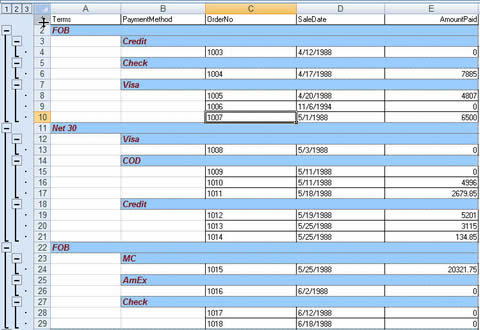
Gruplama ile dışa aktarma
Bu örnek, veri gruplama özelliğini gösterir
Ekran görüntüsü
Excel biçimi
Kaynak kodu
unit ExportWithGrouping;

Interface

uses
  Windows, Messages, SysUtils, Classes, Graphics, Controls, Forms, Dialogs,
  lxGridxls, Db, Grids, DBGrids, DBTables, StdCtrls;

type
  TForm1 = class(TForm)
    Query1: TQuery;
    DBGrid1: TDBGrid;
    DataSource1: TDataSource;
    lxGridxls1: TGridToXLS;
    btnSaveAs: TButton;
    SaveDialog1: TSaveDialog;
    procedure btnSaveAsClick(Sender: TObject);
  private
    { Private declarations }
  public
    { Public declarations }
  end;

var
  Form1: TForm1;

implementation

{$R *.DFM}

procedure TForm1.btnSaveAsClick(Sender: TObject);
begin
  If SaveDialog1.Execute then begin
     //disable button
     btnSaveAs.Enabled := false;

     with lxGridxls1 do begin

        GroupFont.Color := clMaroon;
        GroupFont.Size := 10;
        GroupFont.Name := 'Arial';
        GroupFont.Style := [fsBold, fsItalic];

        GroupColor := clYellow;

        GroupBorderStyle := BorderStyleSingleThin;

        GroupFields.Clear;
        GroupFields.Add('Terms');
        GroupFields.Add('PaymentMethod');
     end;

     lxGridxls1.SaveDBGridAs(SaveDialog1.FileName);
     btnSaveAs.Enabled := true;
  end;
end;

end.