<κλάση header="doc-nav" aria-label="Πλοήγηση τεκμηρίωσης">
Τεκμηρίωση HotXLS
<κλάση nav="doc-links">
Περιεχόμενα
Αρχική
Επισκόπηση
TGridToXLS
IXLSWorkbook
<κλάση div="nav topic-quick-nav" aria-label="Topic shortcuts">
Αρχική
Περιεχόμενα
Επισκόπηση
PatternColorIndex ιδιότητα
<κλάση div="indent">
<κλάση div="txt">
Επιστρέφει or sets the color of the interior pattern as an index into the current color palette, or as one of the following XlColorIndex constants: xlColorIndexAutomatic or xlColorIndexNone. Read/write LongWord
Σύνταξη
<κλάση div="indent">
<κλάση div="txt">
property PatternColorIndex: LongWord;
<κλάση div="indent">
Παρατηρήσεις
<κλάση div="indent">
<κλάση div="txt">
Set this property to xlColorIndexAutomatic to specify the automatic pattern for cells. Set this property to xlColorIndexNone to specify that you don't want a pattern (this is the same as setting the Pattern property of the Interior object to xlPatternNone)
<κλάση div="txt">
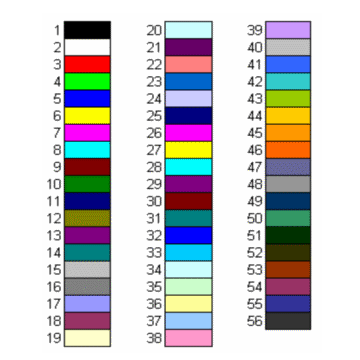
The following illustration shows the color-index values in the default color palette
Παράδειγμα
<κλάση div="indent">
<κλάση div="txt">
This example sets the color of the interior pattern for range A1:C10 on Worksheet one
<κλάση pre="code">
Workbook.Worksheets[1].Range['A1', 'C10'].Interior.Pattern := xlChecker;
Workbook.Worksheets[1].Range['A1', 'C10'].Interior.PatternColorIndex := 8;
<κλάση footer="reference-footer">Copyright © 2010-2026 losLab Software