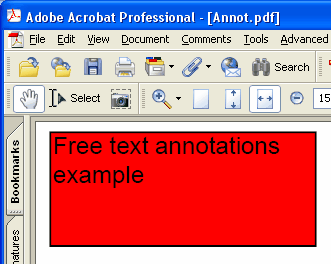
Adds new FreeText annotation on the current page.
type
THPDFFreeTextAnnotationJust = ( ftLeftJust, ftCenter, ftRightJust );
Delphi 語法:
procedure AddFreeTextAnnotation ( Contents: AnsiString; Rectangle: TRect; Quadding: THPDFFreeTextAnnotationJust; Color: TColor = clRed );
C++ 語法:
void __fastcall AddFreeTextAnnotation ( AnsiString Contents, Windows::TRect &Rectangle, THPDFFreeTextAnnotationJust Quadding, Graphics::TColor Color );
說明
使用 AddFreeTextAnnotation 在目前頁面加入新的 FreeText annotation,並指定 text message(Contents)、rectangle area(Rectangle)、justification(Quadding)與 color
數值意義
ftLeftJust Left justification.
ftCenter Center justification.
ftRightJust Right justification.
超出 ASCII 範圍的內容(中文、日文、韓文、阿拉伯文、西里爾文等)會透過 AnsiString 多載以 UTF-8 傳入,或以 WideString 傳入。這類註解會取得自己的外觀,以頁面目前字型 12 pt 繪製文字,所以新增註解前請先用 SetFont 選一個涵蓋這些字元的字型。該字型會與頁面文字一起內嵌,文字行會在矩形內換行並遵循 Quadding。純 ASCII 內容則保持原本的普通註解,由檢視器以 Helvetica 繪製;在 PDF/A 與 PDF/X 下不允許未內嵌的 Helvetica,這時同樣會以已內嵌的頁面字型繪製