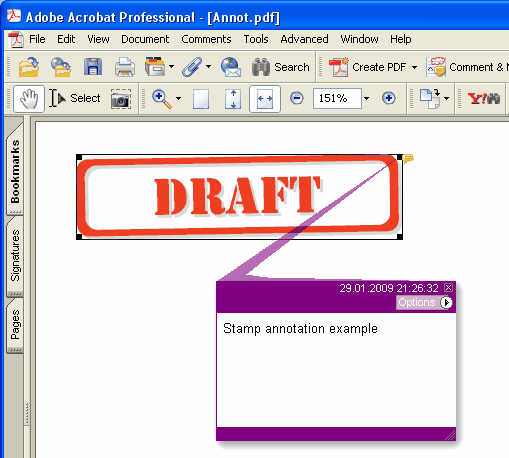
Adds new Stamp annotation on the current page.
type
THPDFStampAnnotationType = (satApproved, satExperimental, satNotApproved, satAsIs, satExpired,
satNotForPublicRelease, satConfidential, satFinal, satSold, satDepartmental,
satForComment, satTopSecret, satDraft, satForPublicRelease);
Delphi syntax:
procedure AddStampAnnotation ( Contents: AnsiString; Rectangle: TRect; StampType: THPDFStampAnnotationType; Color: TColor = clRed );
C++ syntax:
void __fastcall AddStampAnnotation ( AnsiString Contents, Windows::TRect &Rectangle, THPDFStampAnnotationType StampType, Graphics::TColor Color);
Opis
Użyj AddStampAnnotation, aby dodać nową adnotację Stamp na bieżącej stronie z określoną wiadomością tekstową (Contents), obszarem prostokąta (Rectangle), typem (StampType) i kolorem
Value Meaning
satApproved Approved stamp
satExperimental Experimental stamp
satNotApproved NotApproved stamp
satAsIs AsIs stamp
satExpired Expired stamp
satNotForPublicRelease NotForPublicRelease stamp
satConfidential Confidential stamp
satFinal Final stamp
satSold Sold stamp
satDepartmental Departmental stamp
satForComment ForComment stamp
satTopSecret GóraSecret stamp
satDraft Draft stamp
satForPublicRelease ForPublicRelease stamp
Gdy dokument wymaga wyglądu dla każdej adnotacji (PDF/A-2 lub nowszy, PDF/X-6 albo PDF 2.0), pieczątka jest rysowana jako ramka w kolorze Color z nazwą pieczątki wielkimi literami wycentrowaną w środku, o wysokości równej połowie prostokąta lub mniejszej, żeby zmieściła się w szerokości. Przy PDF/A i PDF/X, gdzie nieosadzona Helvetica jest niedozwolona, nazwa jest rysowana bieżącym fontem strony, osadzanym razem z tekstem strony, więc wybierz go przez SetFont przed dodaniem pieczątki