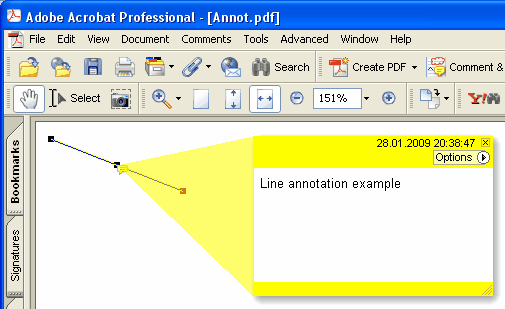
Voegt een nieuwe Line-annotatie toe aan de huidige pagina.
Delphi-syntaxis:
procedure AddLineAnnotation ( Inhoud: AnsiString; BeginPoint: THPDFCurrPoint; EndPoint: THPDFCurrPoint; Color: TColor = clRed );
THPDFCurrPoint Type Definition
TPDFCurrPoint defines a point

Unit
HPDFDoc

type
    THPDFCurrPoint = record
        X: Extended;
        Y: Extended;
end;

Beschrijving:
The THPDFCurrPoint type defines a pixel location. X specifies the horizontal coordinate of the point, Y specifies the vertical coordinate.
C++-syntaxis:
void __fastcall AddLineAnnotation ( AnsiString Inhoud, THPDFCurrPoint &BeginPoint, THPDFCurrPoint &EndPoint, Graphics::TColor Color );
Beschrijving
Use AddLineAnnotation to add new Line annotation specified text message ( Inhoud), begin point, end point and color on the current page.
Overload with line-ending styles (HotPDF v2.119.16)
procedure AddLineAnnotation ( Inhoud: AnsiString; BeginPoint, EndPoint: THPDFCurrPoint; BeginStyle, EndStyle: THPDFLineEndingStyle; Color: TColor = clRed );
Deze overload schrijft de PDF /LE [/<begin> /<end>] line-ending-array conform ISO 32000-1 §12.5.6.7 Table 175 + Table 176. De viewer rendert daarna de opgegeven eindpuntmarkeringen (pijlen, streepjes, vormen), zonder dat je ze zelf op de pagina hoeft te tekenen. THPDFLineEndingStyle dekt de volledige set uit Table 176:
lesNone — no endpoint marker (PDF spec default)
lesSquare — filled square
lesCircle — filled circle
lesDiamond — filled diamond
lesOpenArrow — open arrowhead
lesClosedArrow — triangular closed arrowhead
lesButt — short perpendicular tick
lesROpenArrow — reverse-direction open arrow
lesRClosedArrow — reverse-direction closed arrow
lesSlash — ~30° clockwise short tick
Voorbeeld
PDF.CurrentPage.AddLineAnnotation('Width = 120mm',
Point1, Point2, lesClosedArrow, lesClosedArrow, clBlue);