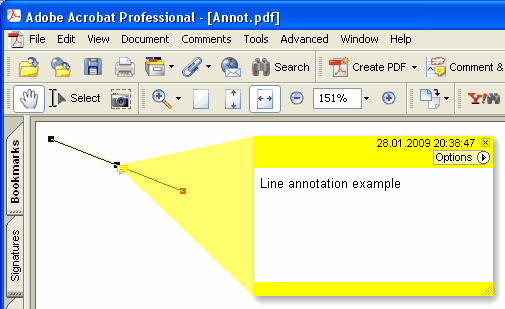
현재 페이지에 새 Line 주석을 추가합니다
Delphi 구문:
procedure AddLineAnnotation ( Contents: AnsiString; BeginPoint: THPDFCurrPoint; EndPoint: THPDFCurrPoint; Color: TColor = clRed );
THPDFCurrPoint Type Definition
TPDFCurrPoint defines a point

Unit
HPDFDoc

type
    THPDFCurrPoint = record
        X: Extended;
        Y: Extended;
end;

Description:
The THPDFCurrPoint type defines a pixel location. X specifies the horizontal coordinate of the point, Y specifies the vertical coordinate.
C++ 구문:
void __fastcall AddLineAnnotation ( AnsiString Contents, THPDFCurrPoint &BeginPoint, THPDFCurrPoint &EndPoint, Graphics::TColor Color );
설명
Use AddLineAnnotation to add new Line annotation specified text message ( Contents), begin point, end point and color on the current page.
Overload with line-ending styles (HotPDF v2.119.16)
procedure AddLineAnnotation ( Contents: AnsiString; BeginPoint, EndPoint: THPDFCurrPoint; BeginStyle, EndStyle: THPDFLineEndingStyle; Color: TColor = clRed );
이 오버로드는 ISO 32000-1 §12.5.6.7 Table 175 + Table 176에 따라 PDF /LE [/<begin> /<end>] 선 끝 배열을 기록합니다. 그러면 호출자가 페이지에 직접 그리지 않아도 뷰어가 지정된 끝점 표시(화살표, 눈금, 도형)를 렌더링합니다. THPDFLineEndingStyle은 Table 176의 전체 집합을 다룹니다:
lesNone — no endpoint marker (PDF spec default)
lesSquare — filled square
lesCircle — filled circle
lesDiamond — filled diamond
lesOpenArrow — open arrowhead
lesClosedArrow — triangular closed arrowhead
lesButt — short perpendicular tick
lesROpenArrow — reverse-direction open arrow
lesRClosedArrow — reverse-direction closed arrow
lesSlash — ~30° clockwise short tick
Example
PDF.CurrentPage.AddLineAnnotation('Width = 120mm',
Point1, Point2, lesClosedArrow, lesClosedArrow, clBlue);