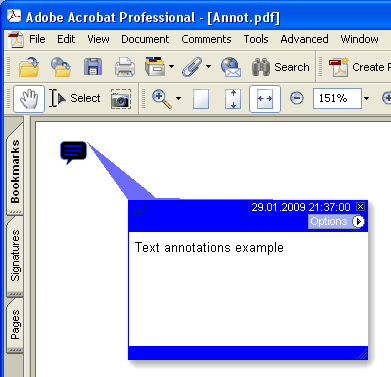
現在のページに新しいテキスト(Text)注釈を追加します
type
THPDFTextAnnotationType = ( taComment, taKey, taNote, taHelp, taNewParagraph, taParagraph, taInsert );
Delphi 構文:
procedure AddTextAnnotation ( Contents: AnsiString; Rectangle: TRect; Open: boolean; Name: THPDFTextAnnotationType; Color: TColor = clRed );
procedure AddTextAnnotation ( Contents: AnsiString; Rectangle: TRect; Open: boolean; Name: THPDFTextAnnotationType; Title: AnsiString; Color: TColor = clRed );
C++ 構文:
void __fastcall AddTextAnnotation ( AnsiString Contents, Windows::TRect &Rectangle, bool Open, THPDFTextAnnotationType Name, Graphics::TColor Color );
void __fastcall AddTextAnnotation ( AnsiString Contents, Windows::TRect &Rectangle, bool Open, THPDFTextAnnotationType Name, AnsiString Title, Graphics::TColor Color );
説明
Use AddTextAnnotation to add new Text annotation specified text message ( Contents), rectangle area ( Rectangle ), icon view ( Name ) and color on the current page. Set Open value to true for opening the annotation or set Open value to false for closing the annotation. Title 付きのオーバーロードは、PDF テキスト注釈の /T タイトル(作者)エントリを書き込みます
Value Meaning
taComment Comment
taKey Key
taNote Note
taHelp Help
taNewParagraph NewParagraph
taParagraph Paragraph
taInsert Insert