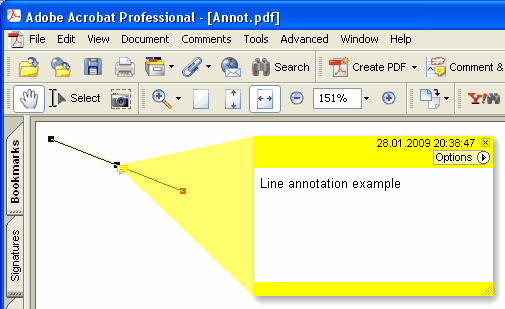
現在のページに新しい線(Line)の注釈を追加します。
Delphi 構文:
procedure AddLineAnnotation ( 目次: AnsiString; BeginPoint: THPDFCurrPoint; EndPoint: THPDFCurrPoint; Color: TColor = clRed );
THPDFCurrPoint 型定義
TPDFCurrPoint defines a point

ユニット
HPDFDoc

type
    THPDFCurrPoint = record
        X: Extended;
        Y: Extended;
end;

説明:
The THPDFCurrPoint type defines a pixel location. X specifies the horizontal coordinate of the point, Y specifies the vertical coordinate.
C++ 構文:
void __fastcall AddLineAnnotation ( AnsiString 目次, THPDFCurrPoint &BeginPoint, THPDFCurrPoint &EndPoint, Graphics::TColor Color );
説明
AddLineAnnotation を使用して、指定されたテキストメッセージ (目次)、開始点、終了点、および色を指定して、現在のページに新しい線の注釈を追加します。
線の終端スタイルのオーバーロード (HotPDF v2.119.16)
procedure AddLineAnnotation ( 目次: AnsiString; BeginPoint, EndPoint: THPDFCurrPoint; BeginStyle, EndStyle: THPDFLineEndingStyle; Color: TColor = clRed );
This overload emits the PDF /LE [/<begin> /<end>] line-ending array per ISO 32000-1 §12.5.6.7 Table 175 + Table 176. The viewer then renders the supplied endpoint marks (arrows, ticks, shapes) without the caller having to draw them on the page. THPDFLineEndingStyle covers the full Table 176 set:
lesNone — no endpoint marker (PDF spec default)
lesSquare — filled square
lesCircle — filled circle
lesDiamond — filled diamond
lesOpenArrow — open arrowhead
lesClosedArrow — triangular closed arrowhead
lesButt — short perpendicular tick
lesROpenArrow — reverse-direction open arrow
lesRClosedArrow — reverse-direction closed arrow
lesSlash — ~30° clockwise short tick
例
PDF.CurrentPage.AddLineAnnotation('Width = 120mm',
Point1, Point2, lesClosedArrow, lesClosedArrow, clBlue);