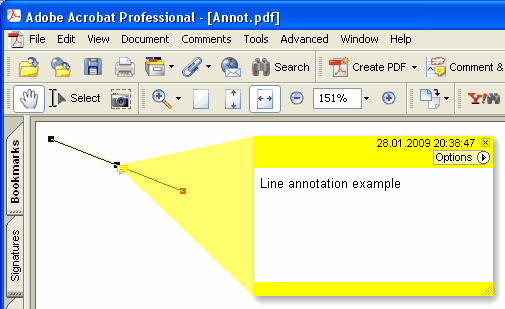
Dodaje novu Line anotaciju na trenutačnu stranicu
Delphi syntax:
procedure AddLineAnnotation ( Contents: AnsiString; BeginPoint: THPDFCurrPoint; EndPoint: THPDFCurrPoint; Color: TColor = clRed );
THPDFCurrPoint Type Definition
TPDFCurrPoint defines a point

Unit
HPDFDoc

type
    THPDFCurrPoint = record
        X: Extended;
        Y: Extended;
end;

Description:
The THPDFCurrPoint type defines a pixel location. X specifies the horizontal coordinate of the point, Y specifies the vertical coordinate.
C++ syntax:
void __fastcall AddLineAnnotation ( AnsiString Contents, THPDFCurrPoint &BeginPoint, THPDFCurrPoint &EndPoint, Graphics::TColor Color );
Opis
Koristite AddLineAnnotation za dodavanje nove Line anotacije sa zadanom tekstualnom porukom ( Contents), početnom točkom, završnom točkom i bojom na trenutnoj stranici
Overload with line-ending styles (HotPDF v2.119.16)
procedure AddLineAnnotation ( Contents: AnsiString; BeginPoint, EndPoint: THPDFCurrPoint; BeginStyle, EndStyle: THPDFLineEndingStyle; Color: TColor = clRed );
Ova varijanta emitira PDF /LE [/<begin> /<end>] niz završetka crte prema ISO 32000-1 §12.5.6.7 Tablica 175 + Tablica 176 Preglednik zatim renderira zadane oznake krajnjih točaka (strelice, crtice, oblike) bez potrebe da ih pozivatelj crta na stranici THPDFLineEndingStyle pokriva cijeli skup iz Tablice 176:
lesNone — no endpoint marker (PDF spec default)
lesSquare — filled square
lesCircle — filled circle
lesDiamond — filled diamond
lesOpenArrow — open arrowhead
lesClosedArrow — triangular closed arrowhead
lesButt — short perpendicular tick
lesROpenArrow — reverse-direction open arrow
lesRClosedArrow — reverse-direction closed arrow
lesSlash — ~30° clockwise short tick
Example
PDF.CurrentPage.AddLineAnnotation('Width = 120mm',
Point1, Point2, lesClosedArrow, lesClosedArrow, clBlue);