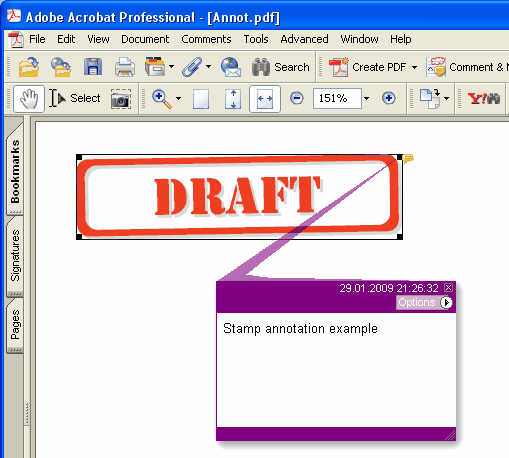
Ajoute une nouvelle annotation Stamp à la page courante.
type
THPDFStampAnnotationType = (satApproved, satExperimental, satNotApproved, satAsIs, satExpired,
satNotForPublicRelease, satConfidential, satFinal, satSold, satDepartmental,
satForComment, satTopSecret, satDraft, satForPublicRelease);
Syntaxe Delphi :
procedure AddStampAnnotation ( Contents: AnsiString; Rectangle: TRect; StampType: THPDFStampAnnotationType; Color: TColor = clRed );
Syntaxe C++ :
void __fastcall AddStampAnnotation ( AnsiString Contents, Windows::TRect &Rectangle, THPDFStampAnnotationType StampType, Graphics::TColor Color);
Description
Utilisez AddStampAnnotation pour ajouter une nouvelle annotation Stamp avec le message texte spécifié ( Contents), la zone rectangulaire ( Rectangle ), le type ( StampType ) et la couleur sur la page courante
Value Meaning
satApproved Approved stamp
satExperimental Experimental stamp
satNotApproved NotApproved stamp
satAsIs AsIs stamp
satExpired Expired stamp
satNotForPublicRelease NotForPublicRelease stamp
satConfidential Confidential stamp
satFinal Final stamp
satSold Sold stamp
satDepartmental Departmental stamp
satForComment ForComment stamp
satTopSecret HautSecret stamp
satDraft Draft stamp
satForPublicRelease ForPublicRelease stamp
Quand le document exige une apparence pour chaque annotation (PDF/A-2 ou ultérieur, PDF/X-6 ou PDF 2.0), le tampon est dessiné comme un cadre en Color avec le nom du tampon en capitales centré à l’intérieur, à la moitié de la hauteur du rectangle ou moins pour tenir dans la largeur. Sous PDF/A et PDF/X, où une Helvetica non embarquée est interdite, le nom est dessiné dans la police courante de la page, embarquée avec le texte de la page ; choisissez-la donc avec SetFont avant d’ajouter le tampon