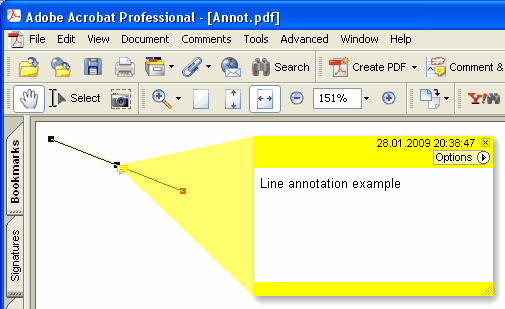
Añade una nueva anotación Line a la página actual.
Sintaxis Delphi:
procedure AddLineAnnotation ( Contenido: AnsiString; BeginPoint: THPDFCurrPoint; EndPoint: THPDFCurrPoint; Color: TColor = clRed );
THPDFCurrPoint Type Definition
TPDFCurrPoint defines a point

Unit
HPDFDoc

type
    THPDFCurrPoint = record
        X: Extended;
        Y: Extended;
end;

Descripción:
The THPDFCurrPoint type defines a pixel location. X specifies the horizontal coordinate of the point, Y specifies the vertical coordinate.
Sintaxis C++:
void __fastcall AddLineAnnotation ( AnsiString Contenido, THPDFCurrPoint &BeginPoint, THPDFCurrPoint &EndPoint, Graphics::TColor Color );
Descripción
Use AddLineAnnotation to add new Line annotation specified text message ( Contenido), begin point, end point and color on the current page.
Overload with line-ending styles (HotPDF v2.119.16)
procedure AddLineAnnotation ( Contenido: AnsiString; BeginPoint, EndPoint: THPDFCurrPoint; BeginStyle, EndStyle: THPDFLineEndingStyle; Color: TColor = clRed );
Esta sobrecarga emite el array de extremos de línea /LE [/<begin> /<end>] según ISO 32000-1 §12.5.6.7 Tabla 175 + Tabla 176. El visor dibuja entonces las marcas de extremo indicadas (flechas, marcas, formas) sin que quien llama tenga que dibujarlas en la página. THPDFLineEndingStyle cubre el conjunto completo de la Tabla 176:
lesNone — no endpoint marker (PDF spec default)
lesSquare — filled square
lesCircle — filled circle
lesDiamond — filled diamond
lesOpenArrow — open arrowhead
lesClosedArrow — triangular closed arrowhead
lesButt — short perpendicular tick
lesROpenArrow — reverse-direction open arrow
lesRClosedArrow — reverse-direction closed arrow
lesSlash — ~30° clockwise short tick
Ejemplo
PDF.CurrentPage.AddLineAnnotation('Width = 120mm',
Point1, Point2, lesClosedArrow, lesClosedArrow, clBlue);