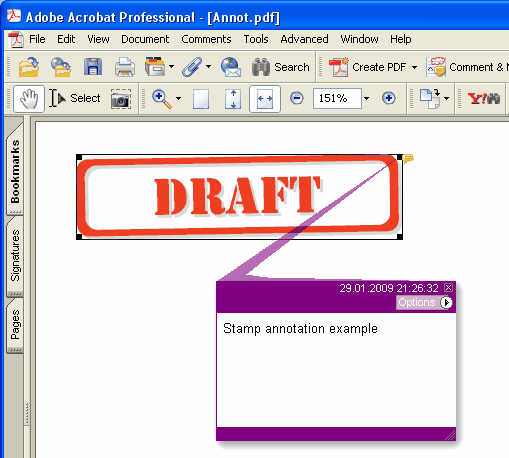
Adds new Stamp annotation on the current page.
type
THPDFStampAnnotationType = (satApproved, satExperimental, satNotApproved, satAsIs, satExpired,
satNotForPublicRelease, satConfidential, satFinal, satSold, satDepartmental,
satForComment, satTopSecret, satDraft, satForPublicRelease);
Delphi syntax:
procedure AddStampAnnotation ( Contents: AnsiString; Rectangle: TRect; StampType: THPDFStampAnnotationType; Colour: TColor = clRed );
C++ syntax:
void __fastcall AddStampAnnotation ( AnsiString Contents, Windows::TRect &Rectangle, THPDFStampAnnotationType StampType, Graphics::TColor Colour);
Description
Use AddStampAnnotation to add new Stamp annotation specified text message ( Contents), rectangle area ( Rectangle ), type ( StampType ) and colour on the current page.
Value Meaning
satApproved Approved stamp
satExperimental Experimental stamp
satNotApproved NotApproved stamp
satAsIs AsIs stamp
satExpired Expired stamp
satNotForPublicRelease NotForPublicRelease stamp
satConfidential Confidential stamp
satFinal Final stamp
satSold Sold stamp
satDepartmental Departmental stamp
satForComment ForComment stamp
satTopSecret TopSecret stamp
satDraft Draft stamp
satForPublicRelease ForPublicRelease stamp
Where the document needs an appearance for every annotation (PDF/A-2 or later, PDF/X-6 or PDF 2.0), the stamp is drawn as a frame in Color with the stamp name in capitals centred inside it, at half the rectangle height or smaller so it fits the width. Under PDF/A and PDF/X, where an unembedded Helvetica is not allowed, the name is drawn in the page's current font, which is embedded together with the page text, so choose it with SetFont before adding the stamp