Erstellt einen neuen Absatz für das PDF-Dokument
Delphi-Syntax:
function CreateParagraph ( Indention: Single; Justification: THPDFJustificationType; LeftMargin, RightMargin: Single ): Integer;
C++-Syntax:
int __fastcall CreateParagraph(float Indention, THPDFJustificationType Justification, float LeftMargin,
float RightMargin, float TopMargin, float BottomMargin);
Beschreibung
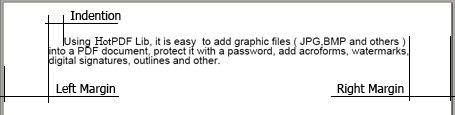
Rufen Sie die Funktion CreateParagraph auf, um dem PDF-Dokument einen neuen Absatz hinzuzufügen. Indention, LeftMargin und RightMargin legen die Absatzeinstellungen fest ( siehe Abbildung unten ), Justification legt die Standardausrichtung des Absatzes fest. Die Funktion CreateParagraph gibt die interne Nummer des neuen Absatzes zurück.
Code Example
HPDF.CurrentParagraph.Justification := hjLeft;
HPDF.CurrentParagraph.ShowText( 'Text aligned to the left' );
HPDF.CurrentParagraph.NewLine;

HPDF.CurrentParagraph.Justification := hjCenter;
HPDF.CurrentParagraph.ShowText( 'Text aligned in the center' );
HPDF.CurrentParagraph.NewLine;

HPDF.CurrentParagraph.Justification := hjRight;
HPDF.CurrentParagraph.ShowText( 'Text aligned to the right' );
HPDF.CurrentParagraph.NewLine;

HPDF.CurrentParagraph.Justification := hjJustify;
HPDF.CurrentParagraph.ShowText( 'Text is fully justified. This means that spaces between words are adjusted to make the text fill the entire line from margin to margin.' );
See also: BeginParagraph, EndParagraph, ParaAutoAddPage